To stop PDF files from opening in the browser window you will need to change the Adobe Reader (or Adobe Acrobat if you have that installed) settings.
Depending on your browser, the PDFs made automatically open in their own window or the download option may appear.
- Open Adobe Reader/Acrobat
- Click on the ‘Edit’ menu then ‘Preferences’
- Click on ‘Internet’ on the side bar
- Under ‘Web Browser Options’ untick ‘Display PDF in browser’
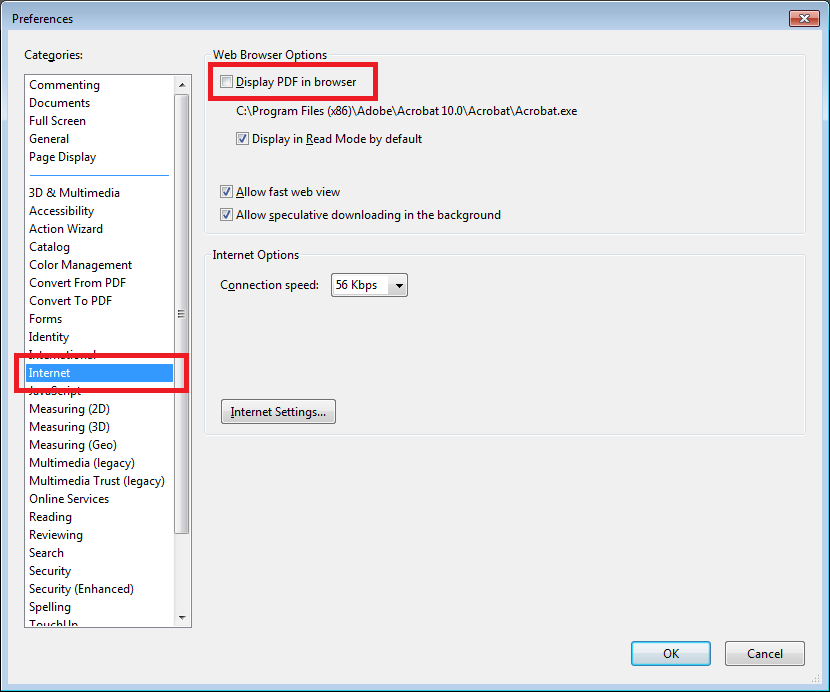
- Click ‘OK’ to save the changes.
Worked for me today 4/16/2022. Due to updates since the original post, some menus might look different or you might not have an updated version of Adobe. Good luck!
Someone stole my “Display PDF in Browser” button.
This has been no help at all….the instructions don’t match!