Here’s a useful tip if you ever need to combine multiple CSV files into one CSV file.
Table of contents
For example, if you have multiple CSV files but need to run a single report (such as a crystal report) based on the data.
Option 1 – Combine CSV files without a header row
The following single command line will combine all CSV files in the folder as a single file titled ‘combined.csv’
copy *.csv combined.csv
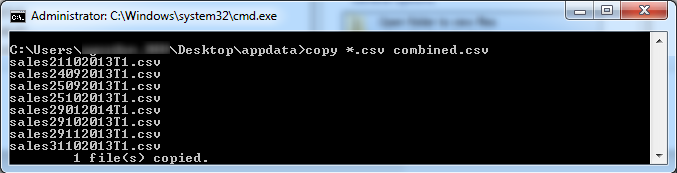
If you want to run this from a cmd file, copy the following contents into a text file and save as ‘run.cmd’.
This command will automatically run from the folder the file is saved in, that is – if you save it to C:\TEMP it will look for CSV files in C:\TEMP and save the new file to C:\TEMP
@echo off
copy %~dp0*.csv %~dp0combined.csv
Option 2 – Combine CSV files with header row
So what if your source files have a header row? The following command will take the header from the first file, then exclude it from the rest. Copy the following contents into a text file and save as ‘run.cmd’.
@ECHO OFF

REM Set working directory
pushd %~dp0

REM Delete existing combined file
del combined.csv

setlocal ENABLEDELAYEDEXPANSION
set total=0
set count=0

REM Set total
for %%i in (*.csv) DO set /a total+=1

for %%i in (*.csv) DO (
cls
echo:Combining CSV files [!count!/%total%]
if !count!==0 (
for /f "delims=" %%j in ('type "%%i"') do echo %%j >> combined.csv
) else if %%i NEQ combined.csv (
for /f "skip=1 delims=" %%j in ('type "%%i"') do echo %%j >> combined.csv
)
set /a count+=1
)

ECHO Finished
PAUSE >NUL
Having troubles?
You can download an example of this script below: www.itsupportguides.com/downloads/csvmerge.zip
Note: this process will only work for CSV files – not XLS (or similar) files.
is there a way using the above bat to remove duplicate values in the combined csv
No, not that I can think of – the script doesnt ‘look’ at the values – just copies line by line into a new file. You’ll need to look at what creates your data or how you’re handling it (reporting tool?) to see if you can do what you want.
Hi, thank you very much for this helpful script. I have the problem, that if i use the file and merge all my csv file, a got a file with more than 5GB. To be able to work with it, i would need files with not more than 2 GB. Is there a way to merge all files in several files (that are not bigger than 2GB)? Thank you very much in advance!
hi guys, the option2 does not work for me. it says the file is not recognised as an internal or external command, operable program of batch file
Hey Bim, did you want to send me a sample of the files (two would do great) that method two isnt working with? Email is qawa77ag@itsupportguides:disqus .com
Okay, you’ve just saved me absolute HOURS of work, concatenating hundreds of CSVs with headers. I love you.
You hit the nail on the head. Thanks for the info, super helpful. BTW, there is an online service through which you can merge any PDF files, the link is here altomerge.