IMPORTANT:
- After 5 December 2019 “Liked videos” in YouTube are private by default.
- YouTube provided an option to DISPLAY to other users – but so far it hasn’t worked.
- CURRENT STATUS: YouTube have removed the option to DISPLAY liked videos to other users.
Check for any updates on the YouTube Help page My liked videos list suddenly private and can’t change it?
THESE INSTRUCTIONS DO NOT CURRENTLY WORK AND WON’T UNTIL YOUTUBE RESTORES THIS FUNCTIONALITY.
YouTube previously displayed a list of “Liked videos” on account video channels. In December 2019 it was changed to NOT display the list – but can be changed.
To SHOW liked videos to the public:
- Go to https://myaccount.google.com/u/0/privacycheckup/10
- Scroll down to ‘Manage what you share on YouTube’
- Under ‘Liked and subscriptions’
- Untick ‘Keep all my liked videos private’
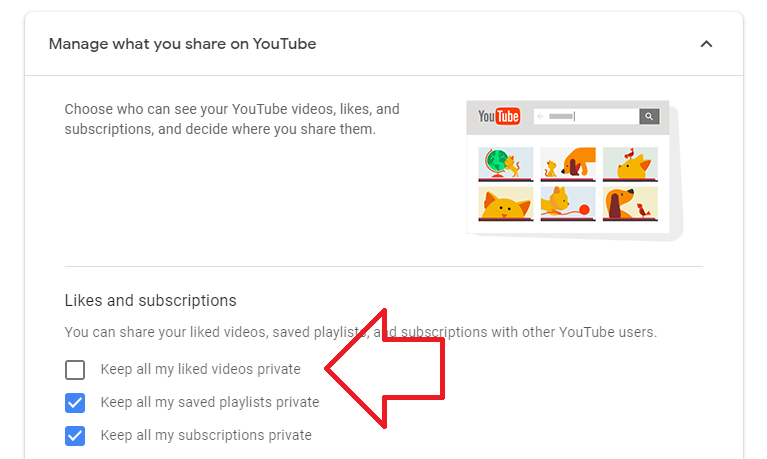
- Liked videos will now appear in your profile video list – e.g. https://www.youtube.com/user/username/videos
HELP! The setting wont save
If the changed setting won’t save – try
- using another browser (e.g. Google Chrome or Firefox)
- using the browser in “private” or “incognito” mode – which forces you to login from fresh
- this link https://www.youtube.com/account_privacy/?disable_polymer=1
That checkbox is not even an option for me now…it used to be, but it’s gone. No options.
I don’t even have an option for liked videos. Only created playlists and subscribers
Same here…
Not working, you change it, but still returning to default after any other action.
The Pigs at YouTube/ADL have no shame!
None of this works and you know none of it works, Adrian Gordon. Why are you wasting people’s time?
I go to uncheck the “keep all my liked videos private” and then after getting the notification “settings saved” it goes back to default when I refresh the page…
What kind of b******t is this?
bruhhhhh i cant changeee it goes back to default. big offf. why youtube had to deal with this liked videos thing in the first place i dont understand. i want to show my liked videos in my channel but youtube says no you dont because we want to make you mad for no reason