The following steps show how to create a silent install package of Firefox, complete with custom configuration.
Note: these settings will be applied for all new and existing users and can not be changed by users.
It does the following tasks:
- Install Firefox silently, without Firefox being the default
- Disables the ‘Automatically check for updates’ option
- Disables the import wizard when Firefox first loads
- Disables the ‘Always check to see if Firefox is the default browser on startup’ option
- Sets homepage to ‘http://www.google.com’ (you can change this in your configuration)
- Disables the ‘know your rights’ button from displaying on first run
- Disables the request to send performance data from displaying
How to customise and deploy (silent install) Firefox
- Create a temporary working folder for saving the files into (for example, create C:\TEMP\Firefox)
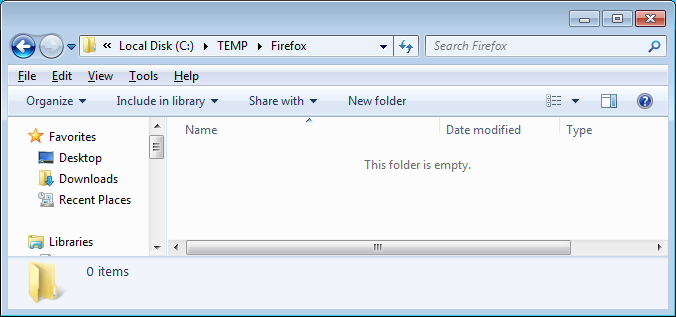
- Download the latest install file at http://www.mozilla.org/en-US/firefox/all . Save to C:\TEMP\Firefox
- Create a new text file called ‘override.ini’ and copy in the following information:
[XRE]
EnableProfileMigrator=false
- Create a new text file called ‘local-settings.js’ and copy in the folling information:
pref("general.config.obscure_value", 0);
pref("general.config.filename", "mozilla.cfg");
- Create a new text file called ‘mozilla.cfg’ and copy in the following information:
//Firefox Default Settings
// set Firefox Default homepage
pref("browser.startup.homepage","http://www.google.com");
// disable default browser check
pref("browser.shell.checkDefaultBrowser", false);
pref("browser.startup.homepage_override.mstone", "ignore");
// disable application updates
pref("app.update.enabled", false)
// disables the 'know your rights' button from displaying on first run
pref("browser.rights.3.shown", true);
// disables the request to send performance data from displaying
pref("toolkit.telemetry.prompted", 2);
pref("toolkit.telemetry.rejected", true);
- Create a new text file called ‘install.cmd’ and copy in the following information
@echo off
REM==========================================
REM Install FireFox 106.0.1
REM==========================================
REM Date : 23 October 2022
REM Author : www.itsupportguides.com
REM .
REM Script Details:
REM --------------
REM This script will:
REM + silently install or upgrade Firefox WITHOUT Firefox being the default browser
REM + Disables the 'Automatically check for updates' option
REM + Disables the 'Always check to see if Firefox is the default browser on startup' option
REM + Deletes desktop icon
REM + Disables the Import Wizard
REM + Works for Windows 7 /8 32-bit and 64-bit
REM .
REM===========================================
echo Installing Firefox - Please Wait.
echo Window will close after install is complete
REM Installing Firefox
"%~dp0Firefox Setup 106.0.1.exe" -ms
REM Install 64-bit customisations
if exist "%ProgramFiles(x86)%\Mozilla Firefox\" copy /Y "%~dp0override.ini" "%ProgramFiles(x86)%\Mozilla Firefox\browser\"
if exist "%ProgramFiles(x86)%\Mozilla Firefox\" copy /Y "%~dp0mozilla.cfg" "%ProgramFiles(x86)%\Mozilla Firefox\"
if exist "%ProgramFiles(x86)%\Mozilla Firefox\" copy /Y "%~dp0local-settings.js" "%ProgramFiles(x86)%\Mozilla Firefox\defaults\pref"
REM Removes Firefox Desktop Icon - Windows 7 / 8
if exist "%public%\Desktop\Mozilla Firefox.lnk" del "%public%\Desktop\Mozilla Firefox.lnk"
- Copy the Firefox install file, override.ini, mozilla.cfg, local-settings.js and install.cmd to your software package share
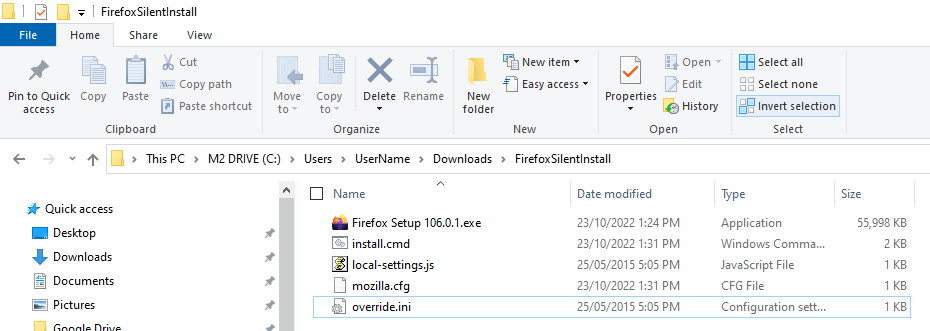
- You can now create your SCCM package or deploy the software by using install.cmd.
For more information on creating SCCM packages see SCCM – How to Distribute Software Packages.
More Firefox configurations:
Please refer to the following articles for some more common customisations:
Hi AppPackager –
Appologies for the broken link.
I’ve done another write up (which includes the download you’re looking for) here-
[url]
http://mockbox.net/configmgr-sccm/458-firefox-9-enable-automatic-ntlm-authentication-for-intranet-sites.html%5B/url%5D
You have written a great article and it saves a lot of time when I package today.
You have mentioned about code to put to take care of NTLM authentication in your comment. I am not able to download it as the URL is no longer valid. Can you post here what needs to be done in the file.
Thanks.
For anyone getting the:
“Failed to read the configuration file”
Error message “lockPref” seems to be case sensitive. Had the same problem as few other users above but changing the value from “lockpref” to “lockPref” solves the problem.
Cheers,
HI Sandra –
You’re right to say that it’s become more complicated, particularly since FF3, however I (and many others) have been able to use this method to deploy FF with the required configurations.
Download the full compiled source and try working from there.
Edit the ‘mozilla.cfg’ with your required settings.
The fun part is working out how to code it up.
Full download: http://mockbox.net/downloads/Firefox901SilentInstall.zip
What has happened to Firefox beats me, as there are no .js or .cfg files in FF9 at all, it’s only mumbo jumbo you can’t change, not under XP, not under Vista or under Se7en. Ever since FF2 I’ve been getting to know Java, so i could change settings and add or remove lines in the prefs.js, but now that fun has vanished :S
When the .js and .cfg parts stay hidden in future FF editions it’s no use installing it anymore, because without this freedom FF is even worse than IE :S
Sorry people @ Mozilla Firefox, but that’s how it feels to me, you’re becoming a second Microsoft, hiding the open source part for your users.