
Using Gravity Forms ‘gform_field_standard_settings’ PHP action
The 'gform_field_standard_settings' PHP filter is a powerful tool for customizing Gravity Forms' field settings.
The 'gform_field_standard_settings' PHP filter is a powerful tool for customizing Gravity Forms' field settings.
The 'gform_field_advanced_settings' filter modifies advanced settings in Gravity Forms.
Learn how to use the Gravity Forms `gform_encrypt_password` PHP filter to encrypt passwords in your WordPress website. Discover different ways to apply encryption based on specific conditions like form titles…
Learn how to use the Gravity Forms `gform_is_encrypted_field` PHP filter to determine if an entry field is stored encrypted. Customize the default behavior of decrypting fields that have been encrypted…

The 'login_form_top' PHP filter in WordPress allows developers to easily customize the login form at the top of the page.
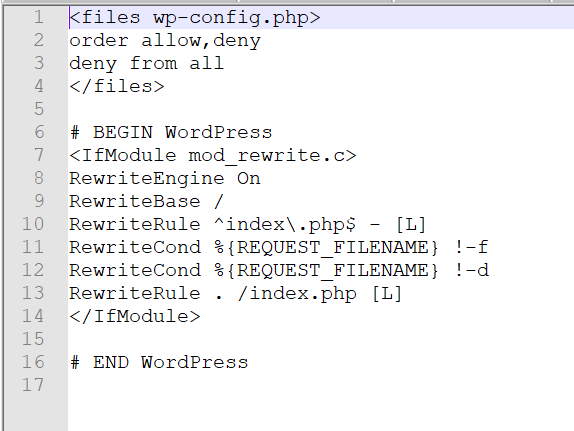
Learn how to protect your WordPress site's wp-config.php file with our step-by-step guide. Add the code provided to your.htaccess file to prevent unauthorized access and keep your site secure.

Windows 10 - Home vs Pro - Which one to choose? Learn about the key differences between Windows 10 Home and Pro editions, including features such as BitLocker, Remote Desktop,…

Learn about various methods to protect your email address from being harvested by spammers while still making it accessible to genuine visitors on your website.
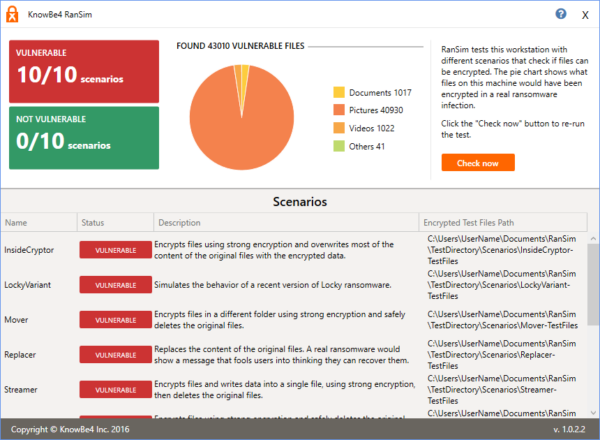
RanSim - A Free Tool to Test Your Computer's Vulnerability to CryptoLocker Style Ransomware"**