If you receive an iPhone which has an unknown PIN number you will need to wipe and reset it.
The process below details how to wipe it to factory defaults.
- Install iTunes on a desktop computer from the Apple website
- Using the iPhone USB cable, plug the iPhone into the computer
- Hold down the ‘home’ button and the ‘sleep’ button at the same time for about 20-30 seconds
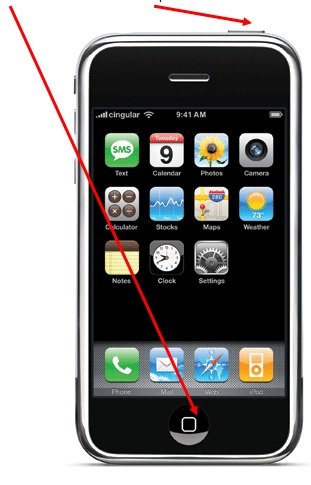
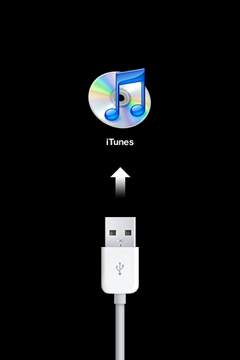
- Release the buttons when you see an iTunes icon and USB cable on the iPhone screen
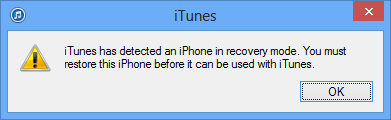
- On the desktop computer iTunes will prompt that you have booted into ‘recovery mode’ Click ‘OK’ to continue.
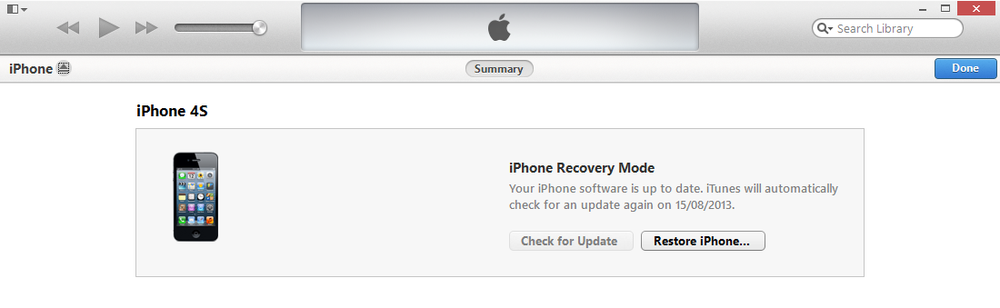
- Click on the ‘Restore iPhone’ button
- A message will open, click ‘Restore and Update’ to start the restoration process.
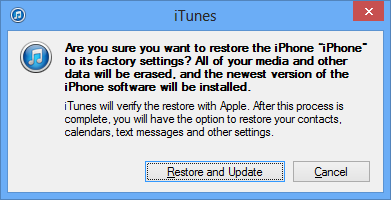
- This restoration will take 10 minutes. DO NOT UNPLUG OR TURN OFF THE IPHONE UNTIL COMPLETED.
- The iPhone will beep once when completed. On the screen you will see it is ready to use.
Thank you for this post. You saved my life. I plan to sell my iPhone 6, and I feared it was going to become a doorstop. Thank you so much for the excellent explanation.
what happends if the serial number is still active under another phone number
Help! Upgraded phone to new operating system and first it no linger recognized my password, then, after change, it no longer recognizes the PIN. Phone is locked. help
Help! Did all that and I has the PIN, (did it to upgrade operating system) and now it will not rcognize my PIN. I cannot get intomy own ihone. HELP!