Problem
By default Windows 10 will install the software (drivers) required to run a NVIDIA video card – it however doesn’t install the ‘NVIDIA Control Panel’ – which is completely optional and not required for everyday use.
Further more – it has terrible reviews on the Microsoft Store – currently 1.5 stars !
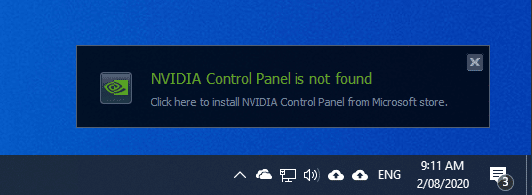
Despite this – Windows will display a prompt every time you turn on the computer which reads
NVIDIA Control Panel is not found

Click here to install NVIDIA Control Panel from Microsoft store.
Solution
These steps show how to disable the ‘NVIDIA Control Panel is not found’ prompt in Windows 10.
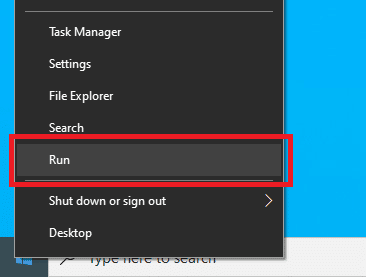
- Right-click on the Start menu and click ‘Run’ (or on the keyboard, press Windows + R)
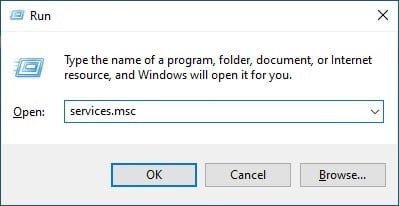
- In the ‘Open:’ box, type ‘services.msc’ and click ‘OK’
- Locate ‘NVIDIA Display Container LS’
- Right-click on it and choose ‘Properties’
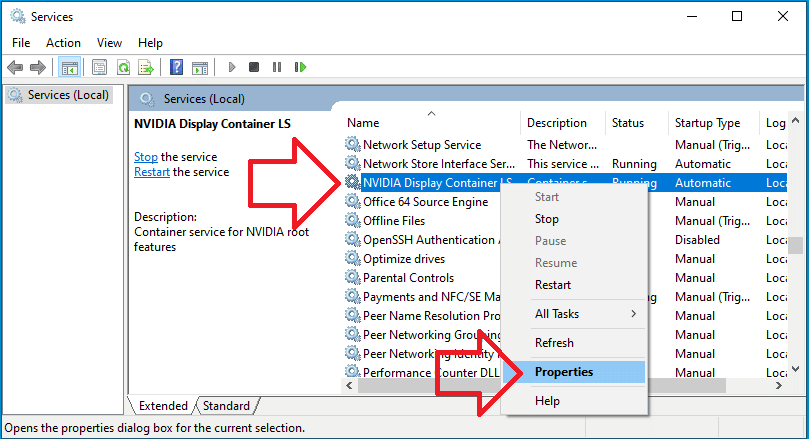
- Change ‘Startup type’ to ‘Disabled’
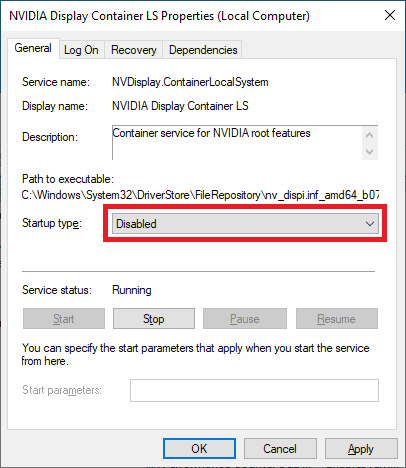
- Click ‘OK’ and close the Services window
- The prompt will no longer appear when you turn on the computer.
Thank you. This solution is so hard to find on searches these days, and so simple to do. But bl***y Bing and Google just want to show results telling us how to install the poxy control panel. Hundreds of search results tell us this. There are about two who tell us what we need to know. Yours is the clearest and most straightforward.
Thanks! This worked like a charm.
It works indeed
This will not work for VDI sessions, because this services is also responsible for de license with a GRID card environment.
So could you please tell us what the solution is if you are running VDI’s?
So could you please tell what the solution is if we are looking to apply to VDI’s?
Much appreciated.