Problem
By default Windows 10 will install the software (drivers) required to run a NVIDIA video card – it however doesn’t install the ‘NVIDIA Control Panel’ – which is completely optional and not required for everyday use.
Further more – it has terrible reviews on the Microsoft Store – currently 1.5 stars !
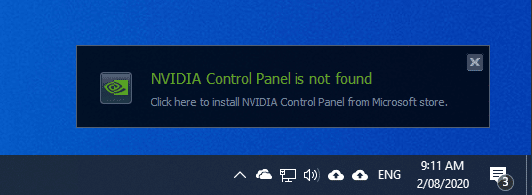
Despite this – Windows will display a prompt every time you turn on the computer which reads
NVIDIA Control Panel is not found

Click here to install NVIDIA Control Panel from Microsoft store.
Solution
These steps show how to disable the ‘NVIDIA Control Panel is not found’ prompt in Windows 10.
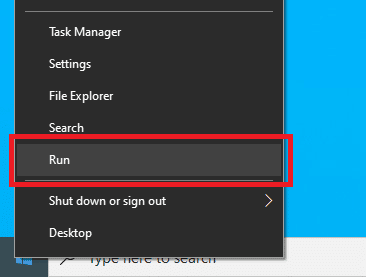
- Right-click on the Start menu and click ‘Run’ (or on the keyboard, press Windows + R)
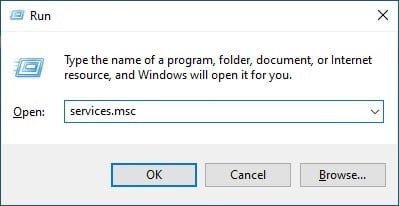
- In the ‘Open:’ box, type ‘services.msc’ and click ‘OK’
- Locate ‘NVIDIA Display Container LS’
- Right-click on it and choose ‘Properties’
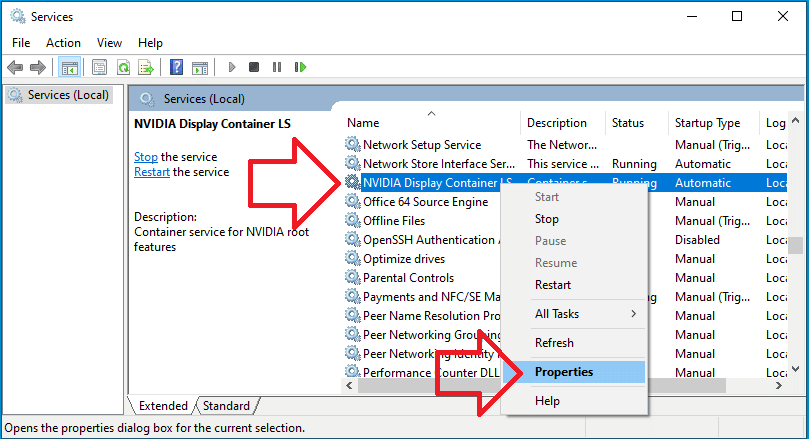
- Change ‘Startup type’ to ‘Disabled’
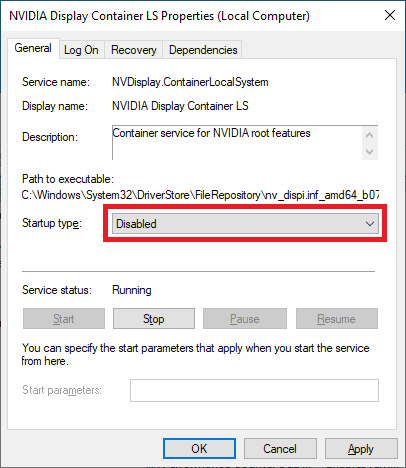
- Click ‘OK’ and close the Services window
- The prompt will no longer appear when you turn on the computer.
5 years so annoied buy this thing and now is gone
thanks so much
You’re my HERO!!
Thanks!
but what was causing the message in the first place? Is the error still happening behind the scenes and just not displaying it? Or did this fix the root cause of the error?
Having an NVIDIA graphics driver installed causes the error. This is because the driver has the capability to be configured and controlled by the NVIDIA control panel. If you did an express installation, it would install the NVIDIA control panel app. If you did a custom/barebones install, it wouldn’t and you would get this pop up due to the graphics driver installing a service that checks for it upon startup. It isn’t necessary to have but it does offer customizability.
THANK YOUUUUUUUUU
Great! works for win11 too