The following steps show how to create a silent install package of Firefox, complete with custom configuration.
Note: these settings will be applied for all new and existing users and can not be changed by users.
It does the following tasks:
- Install Firefox silently, without Firefox being the default
- Disables the ‘Automatically check for updates’ option
- Disables the import wizard when Firefox first loads
- Disables the ‘Always check to see if Firefox is the default browser on startup’ option
- Sets homepage to ‘http://www.google.com’ (you can change this in your configuration)
- Disables the ‘know your rights’ button from displaying on first run
- Disables the request to send performance data from displaying
How to customise and deploy (silent install) Firefox
- Create a temporary working folder for saving the files into (for example, create C:\TEMP\Firefox)
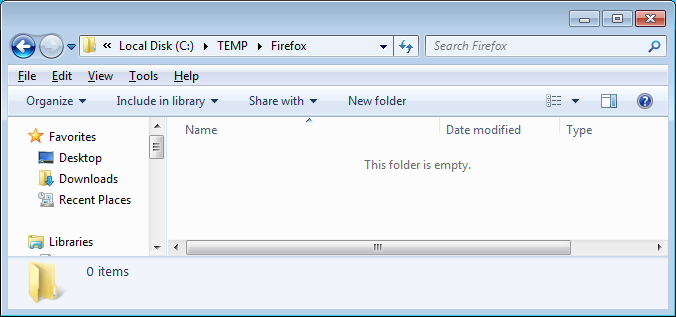
- Download the latest install file at http://www.mozilla.org/en-US/firefox/all . Save to C:\TEMP\Firefox
- Create a new text file called ‘override.ini’ and copy in the following information:
[XRE]
EnableProfileMigrator=false
- Create a new text file called ‘local-settings.js’ and copy in the folling information:
pref("general.config.obscure_value", 0);
pref("general.config.filename", "mozilla.cfg");
- Create a new text file called ‘mozilla.cfg’ and copy in the following information:
//Firefox Default Settings
// set Firefox Default homepage
pref("browser.startup.homepage","http://www.google.com");
// disable default browser check
pref("browser.shell.checkDefaultBrowser", false);
pref("browser.startup.homepage_override.mstone", "ignore");
// disable application updates
pref("app.update.enabled", false)
// disables the 'know your rights' button from displaying on first run
pref("browser.rights.3.shown", true);
// disables the request to send performance data from displaying
pref("toolkit.telemetry.prompted", 2);
pref("toolkit.telemetry.rejected", true);
- Create a new text file called ‘install.cmd’ and copy in the following information
@echo off
REM==========================================
REM Install FireFox 106.0.1
REM==========================================
REM Date : 23 October 2022
REM Author : www.itsupportguides.com
REM .
REM Script Details:
REM --------------
REM This script will:
REM + silently install or upgrade Firefox WITHOUT Firefox being the default browser
REM + Disables the 'Automatically check for updates' option
REM + Disables the 'Always check to see if Firefox is the default browser on startup' option
REM + Deletes desktop icon
REM + Disables the Import Wizard
REM + Works for Windows 7 /8 32-bit and 64-bit
REM .
REM===========================================
echo Installing Firefox - Please Wait.
echo Window will close after install is complete
REM Installing Firefox
"%~dp0Firefox Setup 106.0.1.exe" -ms
REM Install 64-bit customisations
if exist "%ProgramFiles(x86)%\Mozilla Firefox\" copy /Y "%~dp0override.ini" "%ProgramFiles(x86)%\Mozilla Firefox\browser\"
if exist "%ProgramFiles(x86)%\Mozilla Firefox\" copy /Y "%~dp0mozilla.cfg" "%ProgramFiles(x86)%\Mozilla Firefox\"
if exist "%ProgramFiles(x86)%\Mozilla Firefox\" copy /Y "%~dp0local-settings.js" "%ProgramFiles(x86)%\Mozilla Firefox\defaults\pref"
REM Removes Firefox Desktop Icon - Windows 7 / 8
if exist "%public%\Desktop\Mozilla Firefox.lnk" del "%public%\Desktop\Mozilla Firefox.lnk"
- Copy the Firefox install file, override.ini, mozilla.cfg, local-settings.js and install.cmd to your software package share
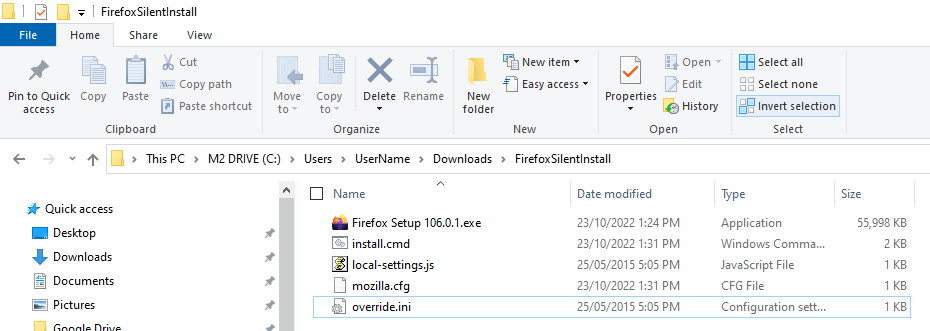
- You can now create your SCCM package or deploy the software by using install.cmd.
For more information on creating SCCM packages see SCCM – How to Distribute Software Packages.
More Firefox configurations:
Please refer to the following articles for some more common customisations:
I found the correct entry in Mozilla.cfg to make a default homepage that users can change to their own preference.
From: http://mike.kaply.com/2012/03/15/customizing-firefox-default-preference-files/
“..to do a default pref, it can get weird. Use:
defaultPref(“browser.startup.homepage”, “data:text/plain,browser.startup.homepage=http://www.bbc.co.uk”);
and it should work.”
[quote]The unfortunate consequence is that once the setting is configured it can not be changed by the user, whether or not you use ‘pref’ or ‘lockPref’.[/quote]
From my experience this is not correct.
Use defaultPref if you want default settings which could be changed by users permanently.
With previous version of FF I know you were able to ROT-13 the mozil.cgf file to give a basic level of protection. This would make it harder for users to edit the file in plan text. I’ve tried using the
pref(“general.config.obscure_value”, 13); in local setting but this isn’t working.
Have Mozilla taken out support for this, or is there something else I’ve been missing?
Hello,
Thx for this article.
I have one question : I need to automaticaly import a .der file during installation. How It could be done ?
Thanks in advance.
It was FF14 that deployed and it works fine. I changd the cfg file to include, forget all history, force users to nominate each donwload location, and to auto detect the proxy. I just used the config file supplied with this origional post and added:
pref(“network.proxy.type”, 4);
pref(“browser.privatebrowsing.autostart”, true);
pref(“browser.download.useDownloadDir”, false);
The only other change I made was to delete the lines which removed the desktop shortcut.