QuickTime is notoriously difficult to distribute as a software package.
The following process has been tested and confirmed as working with QuickTime 7.7.5 and SCCM R3.
The installation will:
- Install QuickTime without the desktop shortcuts
- For safe measure manually delete the QuickTime desktop shortcuts if they already exist
- Remove the QuickTime startup application
- Download standalone installer for QuickTime from http://www.apple.com/au/quicktime/download/
- Open the folder where you saved QuickTimeInstaller.exe whilst holding shift right-click in a blank area of the window.
- Select ‘Open command window here‘
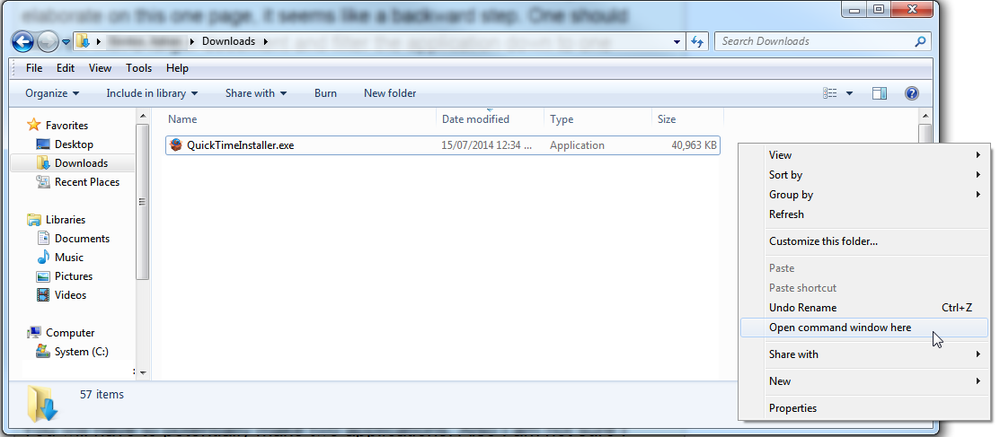
- Run the following command and in the command window
QuickTimeInstaller.exe /extract

- This will leave you with the following msi install files
- AppleApplicationSupport.msi
- AppleSoftwareUpdate.msi
- QuickTime.msi
- QuickTimeInstallerAdmin.msi
- Create a cmd file called ‘install.cmd’ and copy in the following information
@echo off
msiexec /i "%~dp0QuickTime.msi" /quiet /norestart INSTALL_DESKTOP_SHORTCUT="FALSE"
msiexec /i "%~dp0AppleApplicationSupport.msi" /quiet /norestart allusers=1
REM Remove desktop shortcut - Windows XP
if exist "%ALLUSERSPROFILE%\Desktop\QuickTime Player.lnk" del "%ALLUSERSPROFILE%\Desktop\QuickTime Player.lnk"
REM Remove desktop shortcut - Windows 7
if exist "C:\Users\Public\Desktop\QuickTime Player.lnk" del "C:\Users\Public\Desktop\QuickTime Player.lnk"
REM Removes Auto Launch from registry
reg delete "HKEY_LOCAL_MACHINE\SOFTWARE\Microsoft\Windows\CurrentVersion\Run" /v "QuickTime Task" /f
REM Return exit code to SCCM
exit /B %EXIT_CODE%
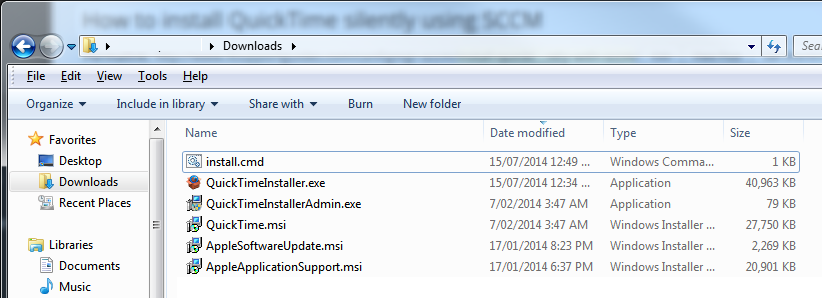
- Copy the MSI files and install.cmd file to your software package share and create your SCCM package, using ‘install.cmd’ to run the installation.
For more information on creating SCCM packages see distribute software using SCCM.
[quote name=”Chris Burt”]Followed instructions and on MDT 2010 SP1 the install fails.[/quote]
My bad, when I copied the script there were some spaces that didn’t need to be there. All is good.
Thanks!
Followed instructions and on MDT 2010 SP1 the install fails.
Thanks a lot! I just used this with SCCM R3 to install QT version 7.69.
For those of you that dont know you create a new application using the install.cmd file as the selected application.
Thanks to OP for the info worked great.
Very helpful solution, removed ongoing headache installing product
Any details around further cunstomization would be appreciated
Thanks to author