The following VBS scripts will allow you to remotely connect to a computer on your network to collect the monitor details.
It retrieves the:
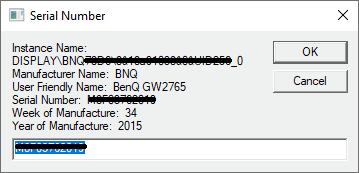
- Instance name
- Manufacture name
- User friendly name (often contains the monitor’s model name)
- Serial number
- Week of manufacture
- Year of manufacture
There are two versions of the script available, one for a single computer and one for a list of computers.
Both can be downloaded below.
Get monitor serial number for a single computer
Get Monitor Info – remotely.vbs
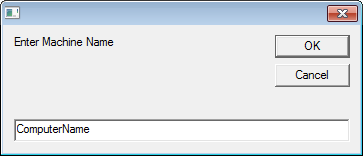
When you run the script it will prompt for the remote computer name:
After entering the remote computer name it will return the information on all attached monitors.
For example:
Get monitor serial number for a list of computers
VBS – Get Monitor Serial Number Remotely – Machine List.zip
Note – Microsoft Excel must be installed on the computer to run this script.
- After downloading and extracting the ZIP file you will find two files,
- MachineList.txt – which holds the list of computers to get the serial numbers from, each computer name needs to be on a new line
- Get_Monitor Info – remotely (MachineList).vbs – the script to run
- Update MachineList with the list of computers
- Run ‘Get_Monitor Info – remotely (MachineList).vbs’
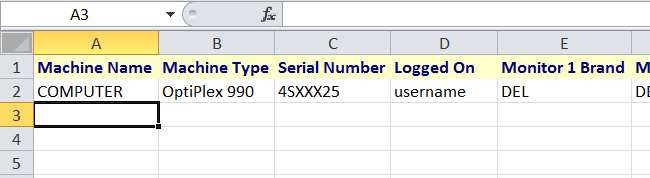
- Microsoft Excel will load and begin to add the header row then the details of each computer
- If a computer is online (available on the network) its details will be recorded then it is removed from MachineList.txt
- If a computer is offline it is marked as ‘Offline’ in the excel document and it remains in MachineList, so you can run the script later when the computer is online.
What need to be enable (Service) and Ports (Open) on remote PC.
I works, tested on Microsoft Windows [Version 10.0.19044.2251], executed as administrator on local as well as on remote PC.
Prompt verson actually working for me (w10 19044.2364), but machine list fails when the generic monitor of a laptop is in use, no problem if only attached monitors are plugged in. Any suggestion?
anyone got this script working in Windows 10?
Nope. I’ve been looking and trying
Any way to get s/n of system and monitor from workgroup joined in Azure