The following VBS scripts will allow you to remotely connect to a computer on your network to collect the monitor details.
It retrieves the:
- Instance name
- Manufacture name
- User friendly name (often contains the monitor’s model name)
- Serial number
- Week of manufacture
- Year of manufacture
There are two versions of the script available, one for a single computer and one for a list of computers.
Both can be downloaded below.
Get monitor serial number for a single computer
Get Monitor Info – remotely.vbs
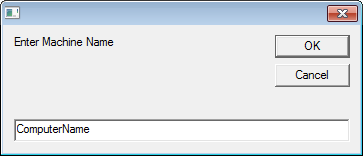
When you run the script it will prompt for the remote computer name:
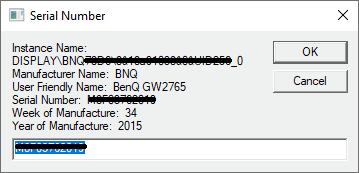
After entering the remote computer name it will return the information on all attached monitors.
For example:
Get monitor serial number for a list of computers
VBS – Get Monitor Serial Number Remotely – Machine List.zip
Note – Microsoft Excel must be installed on the computer to run this script.
- After downloading and extracting the ZIP file you will find two files,
- MachineList.txt – which holds the list of computers to get the serial numbers from, each computer name needs to be on a new line
- Get_Monitor Info – remotely (MachineList).vbs – the script to run
- Update MachineList with the list of computers
- Run ‘Get_Monitor Info – remotely (MachineList).vbs’
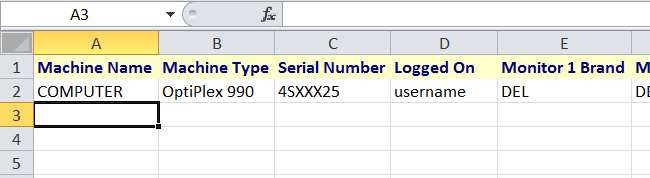
- Microsoft Excel will load and begin to add the header row then the details of each computer
- If a computer is online (available on the network) its details will be recorded then it is removed from MachineList.txt
- If a computer is offline it is marked as ‘Offline’ in the excel document and it remains in MachineList, so you can run the script later when the computer is online.
Hi, can i get vbscript to get all HW .Screen Model , logged user, machine S.N#, machine model, HDD zise , Ram size , number or RAM installed,
MAC Address , Operating System , HD Free Space [GB], HD Used Space [GB], CPU Speed, USB devices installed, HD S/N, HD Model, ect..
Hi Thanks for the script. can I get the docking station serial number
I tried this script and it only gives me my serials and not the others in the list?
thanks, it’s work for me
Hi, i had the same problem like you and by reading the code i realyze that in this part
‘ ——— Check If PC is on ————-
Set WshShell = WScript.CreateObject(“WScript.Shell”)
Set WshExec = WshShell.Exec(“ping -n 1 -w 1000 ” & strComputer) ‘send 3 echo requests, waiting 2secs each
strPingResults = LCase(WshExec.StdOut.ReadAll)
‘—————————————————————
the varaible strPingResults have to contains reply from but i’m in a french environement and the reply of ping is in french so i just replace “reply from” by “réponse de” and i was not enough to make it work because of accented characters so the good formulation was
If InStr(strPingResults, “r” & chr(130) & “ponse de”) Then
‘Successful ping
char(130) = é .
hope this help.
and by the way thank for the script