The following VBS scripts will allow you to remotely connect to a computer on your network to collect the monitor details.
It retrieves the:
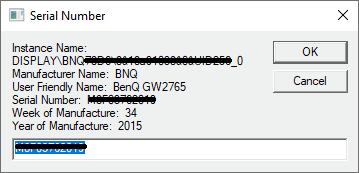
- Instance name
- Manufacture name
- User friendly name (often contains the monitor’s model name)
- Serial number
- Week of manufacture
- Year of manufacture
There are two versions of the script available, one for a single computer and one for a list of computers.
Both can be downloaded below.
Get monitor serial number for a single computer
Get Monitor Info – remotely.vbs
When you run the script it will prompt for the remote computer name:
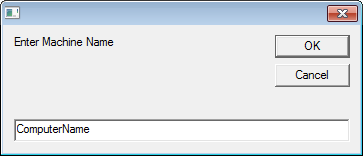
After entering the remote computer name it will return the information on all attached monitors.
For example:
Get monitor serial number for a list of computers
VBS – Get Monitor Serial Number Remotely – Machine List.zip
Note – Microsoft Excel must be installed on the computer to run this script.
- After downloading and extracting the ZIP file you will find two files,
- MachineList.txt – which holds the list of computers to get the serial numbers from, each computer name needs to be on a new line
- Get_Monitor Info – remotely (MachineList).vbs – the script to run
- Update MachineList with the list of computers
- Run ‘Get_Monitor Info – remotely (MachineList).vbs’
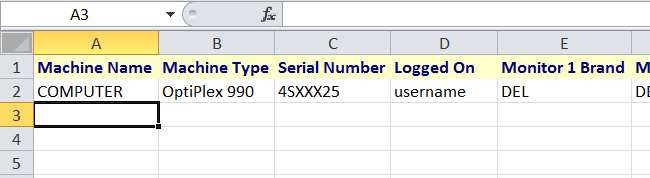
- Microsoft Excel will load and begin to add the header row then the details of each computer
- If a computer is online (available on the network) its details will be recorded then it is removed from MachineList.txt
- If a computer is offline it is marked as ‘Offline’ in the excel document and it remains in MachineList, so you can run the script later when the computer is online.
Great script but tell me that every machine are offline. Any suggestions?
Turn their firewall off. Use services.msc or remote registry edit to disable the firewall.
I had tried to my pc and my co IT pc, this script found ours computers serial number but those other computers that on the same domain and network it didn’t showed any from the other machine that i icluded on machine list. please help thank you this is useful script if it’s gonna work on our network.
Hi, great script 🙂 is there anyway to get this script to report the current logged in user aswell?
Any way to pull the monitor serial numbers from a lenovo thinkpad thats in a docking station?
Desktops and directly attached mointors to machines work, some are wrong serials but the monitors are correct just not pulling ones attached to docking stations.
monitor Serial Number displays only 13 digits, how to make it display the full number?