The following VBS scripts will allow you to remotely connect to a computer on your network to collect the monitor details.
It retrieves the:
- Instance name
- Manufacture name
- User friendly name (often contains the monitor’s model name)
- Serial number
- Week of manufacture
- Year of manufacture
There are two versions of the script available, one for a single computer and one for a list of computers.
Both can be downloaded below.
Get monitor serial number for a single computer
Get Monitor Info – remotely.vbs
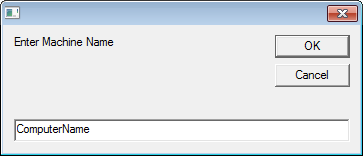
When you run the script it will prompt for the remote computer name:
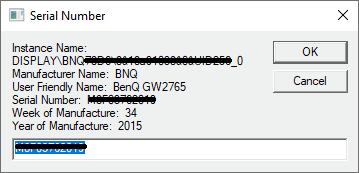
After entering the remote computer name it will return the information on all attached monitors.
For example:
Get monitor serial number for a list of computers
VBS – Get Monitor Serial Number Remotely – Machine List.zip
Note – Microsoft Excel must be installed on the computer to run this script.
- After downloading and extracting the ZIP file you will find two files,
- MachineList.txt – which holds the list of computers to get the serial numbers from, each computer name needs to be on a new line
- Get_Monitor Info – remotely (MachineList).vbs – the script to run
- Update MachineList with the list of computers
- Run ‘Get_Monitor Info – remotely (MachineList).vbs’
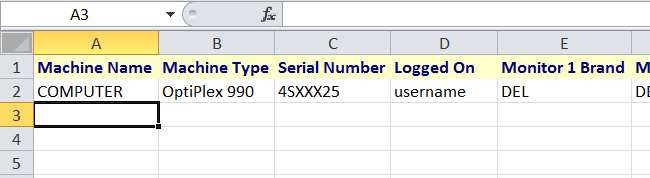
- Microsoft Excel will load and begin to add the header row then the details of each computer
- If a computer is online (available on the network) its details will be recorded then it is removed from MachineList.txt
- If a computer is offline it is marked as ‘Offline’ in the excel document and it remains in MachineList, so you can run the script later when the computer is online.
Hey Man ,
Thanks for script but it’s not working for windows 10 machine.
have you fix the same if yes please share the new script.
Hello and thanks a lot for the great script!
Unfortunately all clients are shown as OFFLINE in the created Excel file. Windows 7 and Windows 10, Firewall is already turned off.
Where I am stumbling over?
Regards
Jay
excellent script but how can I change it so that the outplut is to the clipboard so I can paste it somewhere else………………..or output to a text file?
this question applies to “Get monitor serial number for a single computer” at the very beginning of the page
Hope someone can help 🙂
Dear all, have you tested Get Monitor Info – remotely.vbs on Windows 10? It’s not working. It does not bring any monitor info. Only [Monitor_1] Monitor=Not Found
This is a great script that I used to run very often on Windows 7.
hi! first of all thank you for this script, it helps us determine the pc model, pc serial and the current logged on user.
however, it does not display any monitor information. can u pls help? most of our computers on windows 10
thank you
It looks like things have changed in Windows 10 for how the ‘active’ monitors are recorded in the computers registry. At the moment I can get it to get the monitor details for all monitors they have connected to the computer, not just the current ones. I’ll see if I can figure out a fix for Windows 10.